

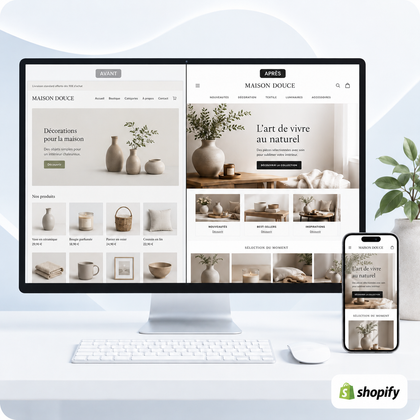




A store can operate technically while still giving an unprofessional impression
Dated design, confusing navigation or inconsistent product sheets weaken trust. The problem becomes serious when several defects accumulate on the mobile, the catalog and the purchasing journey.
The 15 most revealing signs concern three areas: the perceived image, purchasing experience and ability of the store to evolve. An isolated defect is often corrected; an accumulation justifies a broader diagnosis.

The store image no longer matches your activity level
The visitor does not know the history of the site. It immediately judges the consistency between your products, your positioning and the perceived quality of the pages.
A visual identity that has become incoherent
Colors, typographies, icons and button styles vary from page to page, as if several stores had been assembled.
A dated or overloaded homepage
Old promotions, numerous banners and blocks without priority prevent you from quickly understanding the current offer.
Images of very uneven quality
Formats, backgrounds, framing and sharpness change greatly between products, which weakens the coherence of the catalog.
Difficult texts to read
Small print, low contrast, long lines or compact paragraphs make reading difficult, especially on the phone.
Your brand has evolved, but not the site
The offer, the clientele or the level of range have changed while the visuals and messages still describe the old activity.
Example: a store that has gone from a small artisanal selection to several hundred references must often review its home page, its collections and its navigation markers. Just adding new products is no longer enough.
The buying journey creates doubts or unnecessary efforts
A professional store helps the customer find, compare and order. Repeated friction suggests that the architecture and page templates need to be reworked.
Navigation has become confusing
Menus that are too long, redundant categories and imprecise titles force the visitor to guess where the products are located.
The mobile looks like a reduced version
Narrow buttons, poorly framed images, overflowing texts or sections that are too high show that the route was not really designed for the telephone.
The product sheets do not follow any structure
Some sheets are complete, others almost empty; sizes, materials, deadlines or variants are not presented in the same place.
Links, buttons or sections no longer work
Broken links, buttons without destination and missing content give the impression of a poorly followed site, even if the payment works.
Trust is based on vague formulas
Delivery, returns, payment, contact and after-sales service lack precision or are difficult to find before purchase.
To remember: a recent theme does not erase confusing architecture. Professional quality comes above all from the consistency between navigation, content, catalog, reassurance and mobile.
The store has become difficult to maintain and develop
Successive additions can create invisible debt: scattered settings, stacked applications, and templates that are impossible to modify without breaking another area.
Too many applications fulfill similar roles
Pop-ups, reviews, promotions and widgets overlap, make the display heavier or present incompatible visual styles.
Every modification becomes risky
Changing an image or text causes lags because pages rely on workarounds and added code without a common structure.
SEO bases have deteriorated
Repetitive titles, old URLs, duplicate content and inconsistent internal links make it difficult for visitors and engines to understand the catalog.
Small corrections pile up
Outdated prices, old photos, conflicting information and mobile details remain pending due to lack of organized tracking.
You avoid promoting certain pages
If you are hesitant to send prospects to a collection, listing or homepage, the store no longer fully supports your business activity.
To compare your store to a complete database, also consult them 25 Essential Items of a Professional Shopify Store.
How to interpret the number and severity of signs?
Number alone is not enough: a payment or mobile problem can be more urgent than three aesthetic defects. Classify each sign according to its impact on trust, ordering and management.
| Situation observed | Generally appropriate action | Objective | Vigilance |
|---|---|---|---|
| 1 to 3 isolated signs | Targeted fixes or maintenance | Process texts, images, links or mobile details | Check that they are not hiding a structural problem |
| Several inconsistent pages | Targeted redesign of key models | Standardize reception, products and collections | Define what should be kept |
| Mobile, navigation and trust affected | Diagnosis then structured overhaul | Rethink the journey as a whole | Don't just change the colors |
| Deeply transformed offer or catalog | Extended or custom redesign | Align the site with the new business model | Prepare content, data and responsibilities |
No single redesign guarantees an increase in sales. It aims to make the store more coherent, readable and usable. Results also depend on supply, traffic, prices, products and operational quality.
SiteQuiVend maintenance or redesign: what to choose?
Maintenance covers single requests within a double time and volume limit; a new page or complete redesign is a separate quote. Third-party paid themes, applications, licenses and services are not included unless otherwise noted in writing.
Control your store in thirty minutes
- Open Home without logging into your administrator account.
- Explain in one sentence what the store sells and to whom.
- Search for three products from the menu then from the search.
- Compare the structure of five product sheets.
- Test menus, filters, variations and buttons on phone.
- Add a product to cart and verify the information before payment.
- Locate delivery, returns, contact and conditions without using the search engine.
- List promotions, apps and widgets visible at the same time.
- Control the links and pages you use in your campaigns.
- Classify anomalies as blocking, significant or secondary.
If the store works but above all requires continuous monitoring, consult it sitequivend Maintenance. If the problems affect several models and the route, discover it shopify store redesign.
Shopify Store Professionalism FAQ
Does an old store necessarily have to be redesigned?
No. If its structure remains clear, mobile and adapted to the catalog, targeted corrections may be sufficient. The decision depends on the actual issues, not just the age of the theme.
How many signs warrant an overhaul?
There is no automatic threshold. However, several signs affecting navigation, mobile, product sheets and trust simultaneously indicate that a global diagnosis is preferable.
Is changing the theme enough to professionalize the store?
Not always. A theme provides a visual basis, but it does not alone correct the architecture, content, catalog, commercial rules and accumulated inconsistencies.
What is the difference between maintenance and redesign?
Maintenance deals with small, regular interventions in existing sections. The redesign reworks pages or complete models, the design and the route within a validated scope.
Can the store stay online during the redesign?
The progress depends on the theme and organization of the store. When possible, the new version is prepared without disrupting the active store.
What to prepare before a Shopify redesign?
Priority pages, content to keep, texts, images, catalog information and necessary access. The exact scope is confirmed with the quote.
Does a redesign automatically improve sales?
No. It can improve clarity, consistency and experience, but results also depend on supply, prices, products, traffic and business tracking.
When do SiteQuiVend redesign deadlines start?
They begin after validation of the quote and receipt of the necessary access, texts, images and information. Indicative deadlines range from 5 to 21 working days depending on the published formula.
